
From Whitepaper to Working Code: A 30-Minute NDC API Evaluation Guide for Engineering Teams
A practical companion to “Survival Strategy in the Post-GDS Era” — for the engineering teams who actually have to make NDC work.
TL;DR
If your business team has read the post-GDS whitepaper and asked you to evaluate NDC integration, this article shows how to validate HaloSync’s NDC API in 30 minutes — without sales calls, without signed contracts, and without writing custom airline-specific connectors.
The path:
- Sign up for Sandbox at
albus.sandbox.halo-platform.net/sign-up(5 minutes) - Open Swagger UI and explore 10 endpoints (5 minutes)
- Make your first NDC API call against airline-provided sandbox test data (20 minutes)
That is the entire scope of this article.
Why this article exists
Most NDC evaluations stall at the same place. A business team reads a whitepaper, gets convinced that NDC matters, and hands the problem to engineering. Engineering then runs into one of two walls:
- The vendor wall. Sales calls, NDA cycles, custom test environments, and multi-week onboarding before a single API call.
- The integration wall. Even after access is granted, every airline has different schemas, authentication patterns, and edge cases. Six weeks pass before the team can answer the question they were asked: “Does this actually work for us?”
We built HaloSync to remove both walls. This article documents what that looks like from your terminal.
If you have not yet read the business case for NDC adoption, we recommend reading Survival Strategy in the Post-GDS Era first. The current article assumes you already know NDC matters and are now asking: how fast can we validate it?
What 30 minutes actually buys you
In 30 minutes, you can verify the following:
- HaloSync’s NDC API responds with airline-provided sandbox test data (not mocked schemas)
- Authentication, request signing, and field transformation all work without custom code on your side
- The same Swagger UI exposes endpoints for every booking lifecycle operation — search, pricing, booking, post-booking servicing, refunds — across the connected carriers in our carrier support matrix. Per-carrier coverage of each operation varies; the matrix is the source of truth.
- Your team can reproduce the call from
curlor any HTTP client, not just Swagger
This is enough to give your business team a yes/no answer with evidence, instead of a “we need more time to evaluate” response.
What 30 minutes does not buy you:
- Production-grade load testing
- Multi-tenant isolation review
- Full post-booking edge case coverage (group bookings, complex refunds, irregularity handling)
- Commercial pricing alignment
Those come later. Right now we are answering one question: is the API real and usable?
Step 1 — Sandbox sign-up (5 minutes)
Go to albus.sandbox.halo-platform.net/sign-up. Albus is HaloSync’s tenant management console — it issues API credentials, manages allowed airline routes, and provides usage reporting.
You will need:
- Company email
- A name for your tenant (this becomes your
Tenant-ID) - IATA number (optional for Sandbox; required only for Production)
After sign-up, you receive Sandbox credentials (typically issued within ~10 minutes): a tenant identifier and an API secret. These are consumed by whitelabel-middleware server-side — the middleware uses them to sign upstream PolarHub calls with HMAC-SHA512. Your browser or client app never handles the secret directly.
A note on Sandbox scope. Sandbox gives you access to NDC sessions backed by airline-provided sandbox test data (not mocked schemas). Bookings created in Sandbox are not ticketed and do not affect IATA settlement. It is the right environment for evaluation. Per-carrier Sandbox availability and operation coverage are documented in the carrier support matrix.
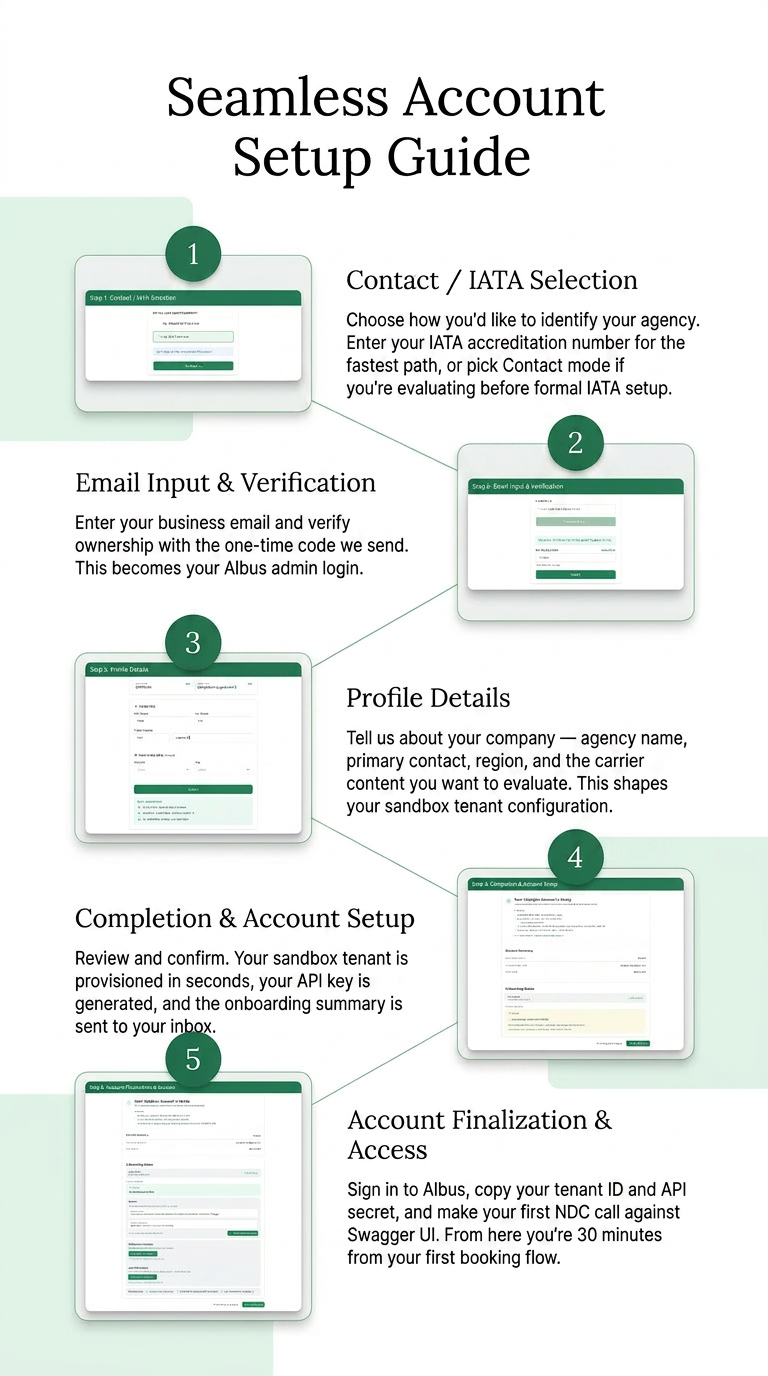
/sign-up form submission to tenant credential issuance.
Step 2 — Open Swagger UI and orient yourself (5 minutes)
whitelabel-middleware is a thin NestJS gateway you run inside your own infrastructure. The repository ships with a runnable server and Swagger UI exposing 10 endpoints organized around the booking lifecycle:
| Phase | Endpoints (route under /middleware/polarhub/) |
|---|---|
| Shopping | air-shopping, offer-price |
| Booking | order (create), order/retrieve |
| Servicing | seat-availability, service-list, order-change |
| Settlement | order/cancel, order-quote (reprice), order-reshop (itinerary change / refund quote) |
All endpoints are POST. The endpoint surface is identical across airlines. When you call air-shopping, the middleware translates your request into the appropriate NDC schema for each connected carrier (NDC 17.2, 18.x, 21.3, or 24.1 depending on carrier), normalizes the responses, and returns a single unified shape. Per-carrier support of each operation varies — refer to the carrier support matrix.
Concretely: you do not write per-airline code. You call one endpoint, you get one response shape. Carrier exception handling — different timeout behaviors, different error code conventions, different ancillary catalog structures — happens server-side, with HaloSync’s PolarHub layer absorbing carrier-specific work behind the middleware.
Open Swagger at http://localhost:3000/middleware (after npm install && npm run start:dev) or against the hosted Sandbox endpoint. You are now ready to call the API.
Step 3 — Your first NDC API call (20 minutes)
Try a simple shopping call. The air-shopping endpoint expects a transaction ID (32-char hex, FE-generated), an origin-destination list, passenger composition, and an airlinePreference indicating which connected carrier(s) to query. The example below targets Singapore Airlines (SQ) on ICN→SIN:
curl -X POST http://localhost:3000/middleware/polarhub/air-shopping \
  -H "Content-Type: application/json" \
  -d '{
    "transactionId": "4ba5a0b50d2c45b3b5eb343b57ba8897",
    "originDestList": [
      { "origin": "ICN", "destination": "SIN", "departureDate": "2026-08-15" }
    ],
    "passengers": [{ "type": "ADT", "count": 1 }],
    "cabin": "Y",
    "criteria": {
      "airlinePreference": { "airlineId": ["SQ"] }
    }
  }'
A real Sandbox response for this request returns 12 offers from SQ, with full pricing breakdowns, fare family names, and carrier-issued OfferIDs.
A few things worth noticing in the response:
- Carrier branding is preserved — fare family names stay airline-native, so your UI can render the carrier’s actual product hierarchy instead of a flattened generic structure.
- Offer IDs are durable across the session — you carry the same
OfferIDfrom search to pricing to booking, including across carrier-specific session state. This is the integration cost most teams underestimate. The middleware absorbs it.
From here, the natural next call is offer-price with the offer you want to confirm, then order (create) to book.
What you have actually verified
If air-shopping returned a populated response, you have just verified four things that matter for a build-or-buy decision:
- Connectivity to airline-provided sandbox content exists. Not a mock. Not a postman collection.
- Multi-carrier abstraction works. A single endpoint shape covers different NDC versions and carrier idiosyncrasies, with per-carrier coverage per the carrier support matrix.
- Onboarding is genuinely self-service. From signup to first call, no sales conversation was required.
- The path forward is documented. Pricing, booking, and post-booking calls follow the same pattern.
These four points are exactly what most “NDC pilot” projects spend 4–8 weeks discovering. You compressed it into 30 minutes.
What to evaluate next (week 1, week 2, week 3)
Once the first call works, the natural evaluation path looks like this:
Week 1 — Booking flow end-to-end. Walk through air-shopping → offer-price → order (create) → order/retrieve against two or three carriers. Confirm that booking references (PNRs) and ticket numbers come back as expected. Confirm payment authentication is handled the way your existing checkout assumes.
Week 2 — Post-booking servicing. This is where most NDC integrations fail in production. Test seat-availability, service-list, and order-change flows. Refund flows in particular: NDC refund handling varies significantly by carrier, and the middleware exposes a normalized workflow — order/retrieve → order-reshop (with cancelOrderRefId) → order/cancel (WF_TKT_REFUND) — that is worth comparing against your current GDS post-booking workflow.
Week 3 — Edge cases and your own systems. Multi-passenger bookings, infant fares, group blocks, schedule change handling, irregular operations notifications. By the end of week 3, your team should be in a position to estimate the integration scope for production with confidence.
This is also the point at which you should be talking to us about commercial terms — not before, because you don’t yet know what to ask. After three weeks of hands-on Swagger work, you will know exactly which capabilities matter for your business and which ones don’t.
A note on AI agents
You may have seen our companion announcement on open-sourcing the AI stack, which includes polarhub-mcp-client — an MCP server exposing the same NDC operations to LLMs.
That is a separate evaluation path, aimed at AI builders rather than OTA backend teams. If your interest is core API integration into an existing booking platform, the Swagger path described in this article is the one to follow. The MCP path becomes relevant later, when you start thinking about agent-driven post-booking automation.
We will write about that in a follow-up article.
MCP today vs roadmap. The MCP server is currently available in Sandbox only and authenticates via a fixed header key. Production environment opening and post-processing automation scope are still being defined. We will share more as that work matures.
Get started
- Sandbox sign-up: albus.sandbox.halo-platform.net/sign-up
- Source code: github.com/HaloSync-Aggregator/whitelabel-middleware
- Carrier support matrix: doc.halo-platform.net/carrier-support-matrix-1541959m0
- Questions:
contact@halocorp.kr
Halo&Co was the team behind Korea’s first commercial NDC integration in 2019, and HaloSync is the platform that team has been building since. We have spent the last seven years on the unglamorous work — carrier-specific exception handling, NDC schema normalization, post-booking servicing — so that your evaluation can take 30 minutes instead of 30 days.
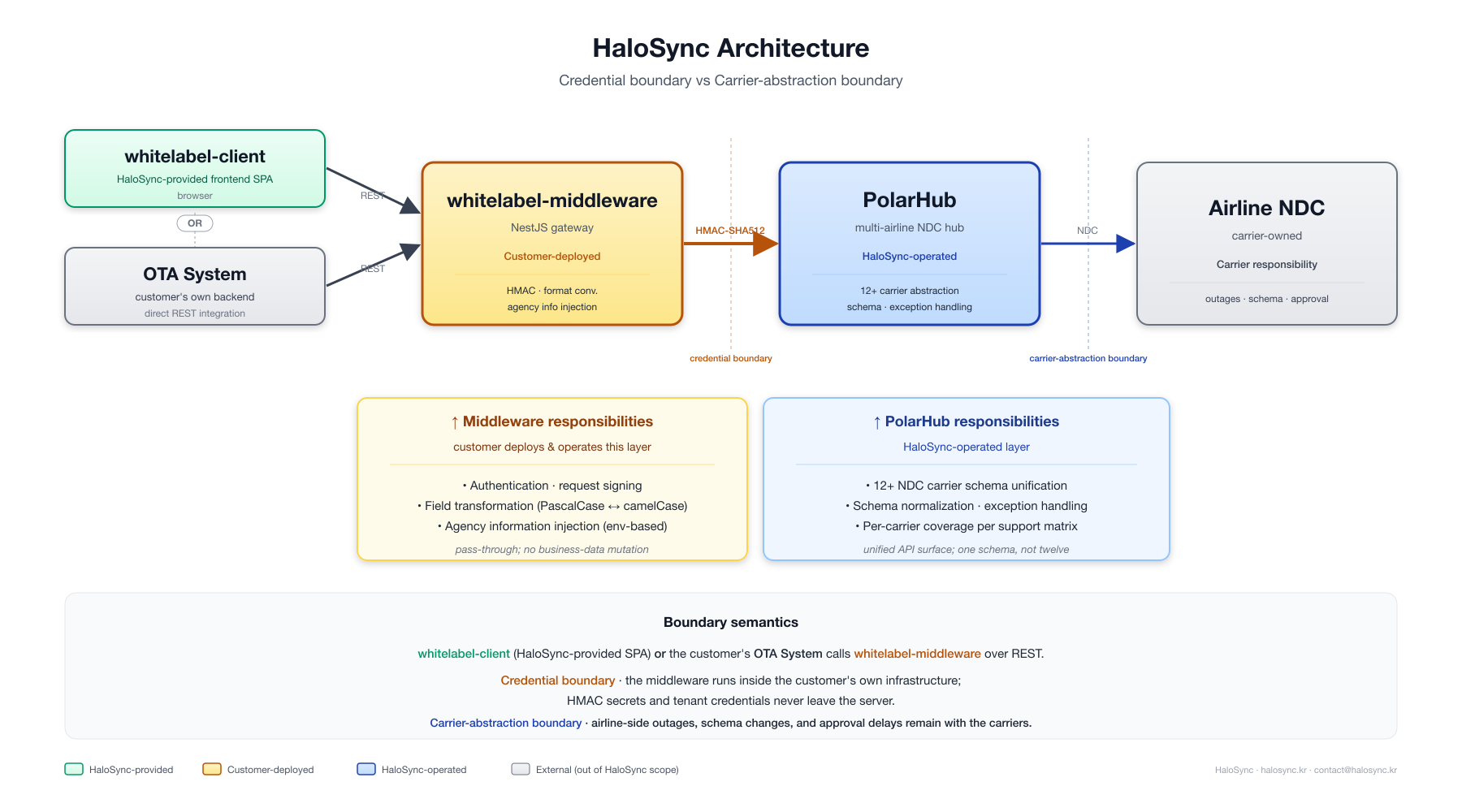
whitelabel-middleware (customer-deployed credential boundary), which forwards signed requests to PolarHub (HaloSync-operated carrier abstraction) and then to airline NDC endpoints.
Beyond API · Travel Infrastructure as a Service.